

Best Mini PC for a Home Office in 2026
Picks refresh twice a day.
A Mini PC is an easy way to build a clean, quiet home-office setup. It can mount behind a monitor, uses a fraction of the power of a traditional desktop tower (see Can a Mini PC Replace a Desktop?), and gives you complete freedom to choose your own monitors, keyboard, and webcam. Most office work does not require an expensive gaming chip, but a few practical specs make the difference between a machine that feels snappy today and one that slows down on a busy workday.
Match The Processor To Your Work
For email, documents, web browsing, bookkeeping, and Zoom or Teams calls, an Intel N100, N150, N97, or N305 Mini PC can do the job at a very low price (often under $300). These chips are efficient and quiet, although they can feel sluggish if you keep dozens of heavy browser tabs open alongside several desktop apps.
A recent AMD Ryzen 5 or Intel Core i5 (typically in the $300 to $500 range) is the best all-around choice for most remote workers. The extra single-core and multi-core speed makes multitasking effortless and gives the computer years of useful life. Step up to a Ryzen 7 or Core i7 if your workday regularly includes massive Excel models, software development, photo editing, video production, or CAD.
You do not need to pay extra for high-end gaming graphics if the machine will only run office apps. Modern integrated graphics already drive multiple 4K displays, hardware-accelerated video calls, and media playback smoothly.
16GB RAM Is The Comfortable Minimum
16GB RAM is the sweet spot for a home-office computer in 2026. It leaves breathing room for a modern browser with 30+ tabs, Microsoft Office or Google Workspace, Slack, Teams, Zoom, and background utilities without swapping to disk. An 8GB model can work for light administrative tasks, but only choose one if the memory is upgradeable or the price is exceptionally low.
Consider 32GB of RAM for software engineering, Docker or virtual machines, Adobe apps, or very heavy multitasking.
Get At Least A 512GB SSD
A 512GB NVMe SSD provides comfortable space for Windows 11 Pro, office suites, local documents, and OS updates. A 256GB drive fills up faster than expected once OneDrive, Dropbox, or Google Drive caches files locally. Choose 1TB if you work with media, large project repositories, or want to keep the machine for several years without opening it up.
Check Your Monitor Connections Before Buying
Mini PCs vary in display support. Confirm that the system has the right combination of HDMI 2.0/2.1, DisplayPort, or USB-C video output (DisplayPort Alt Mode) for your monitors. Most modern Mini PCs easily drive dual or triple 4K@60Hz monitors, and USB-C with Power Delivery + video can let you connect a monitor with a single cable.
Ports, Wi-Fi, And Acoustics Matter
Think through everything that stays plugged in: keyboard, mouse, webcam, USB microphone or headset, printer, and external backup drive. Front-facing USB-A and USB-C ports are convenient for flash drives and headsets.
Look for Wi-Fi 6 / 6E if your desk is far from your router, or plug into Gigabit / 2.5GbE Ethernet for rock-solid video calls. If silence is critical in a quiet room, you can even consider a 0 dB fanless Mini PC.
What Is Worth Paying Extra For?
- 16GB of RAM: the most important baseline for smooth everyday multitasking.
- A recent Ryzen 5 / 7 or Core i5: provides years of snappy performance without overpaying.
- 512GB or 1TB NVMe storage: keeps local files and cloud sync from crowding the boot drive.
- The right display outputs: essential for a clean two- or three-monitor desk.
Current picks
-
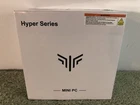
1. Best overall value pick
KAMRUI H2
$349.95Intel Core i5-14450HX16 GB512 GB SSDFar more power than office work needs, with headroom for photo editing, coding, or light video work. Priced at $349.95 as checked on October 30, 2026, this configuration pairs Intel Core i5-14450HX, 16 GB RAM, 512 GB SSD.
-
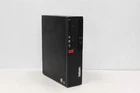
2. Best budget-friendly option
Lenovo THINKCENTRE M75S-1
$100Pre-OwnedSFFAMD Ryzen 5 2400G16 GB256 GB SSDSmooth for everyday documents, browsing, and video calls. Priced at $100 as checked on October 30, 2026, this configuration pairs AMD Ryzen 5 2400G, 16 GB RAM, 256 GB SSD.
-
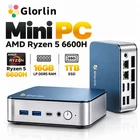
3. High-spec step-up pick
Getorli GT103
$329.99AMD Ryzen 5 6600H16 GB1000 GB SSDFast for heavy office multitasking with lots of tabs, apps, and video calls. Priced at $329.99 as checked on October 30, 2026, this configuration pairs AMD Ryzen 5 6600H, 16 GB RAM, 1000 GB SSD.